
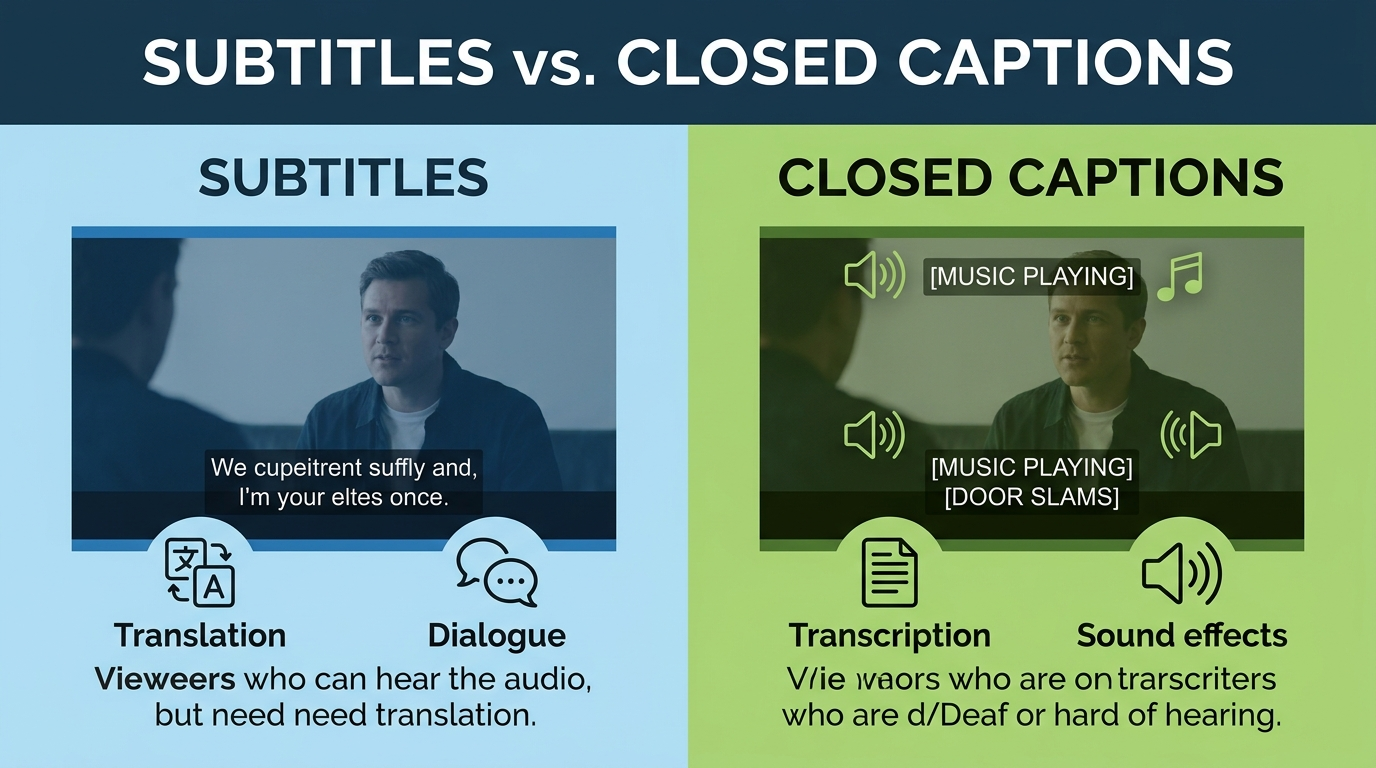
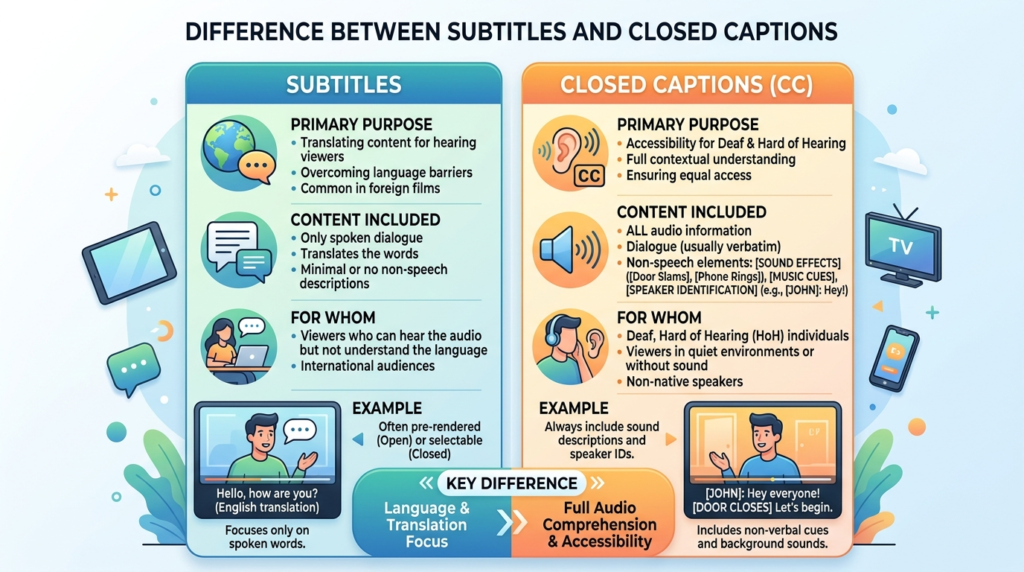
The difference between subtitles and closed captions is that subtitles provide a textual representation of spoken dialogue in video content (usually for viewers who can hear but may not understand the spoken language), while closed captions include not only dialogue but also non‑speech elements — like sound effects, speaker IDs, and music cues — for viewers who are deaf or hard of hearing.
Both improve comprehension, but they serve different accessibility needs and use cases depending on audience and platform.
📌 Why You Need This Guide (and Why It Matters)
In 2026, video content is everywhere — on streaming platforms, social media, online learning, and live broadcasts. But not all text that appears on screen is the same. Understanding the difference between subtitles and closed captions helps you:
-
Deliver inclusive and accessible content
-
Follow legal standards and best practices (ADA, FCC, WCAG)
-
Improve engagement and retention
-
Optimize videos for global and diverse audiences
-
Adapt your workflows across platforms like YouTube, TikTok, Instagram, Netflix, and e‑learning
This guide breaks it all down — definitions, practical examples, workflows, pros and cons, implementation, tips, and FAQs — in clear, human‑friendly language.
🧠What Are Subtitles?
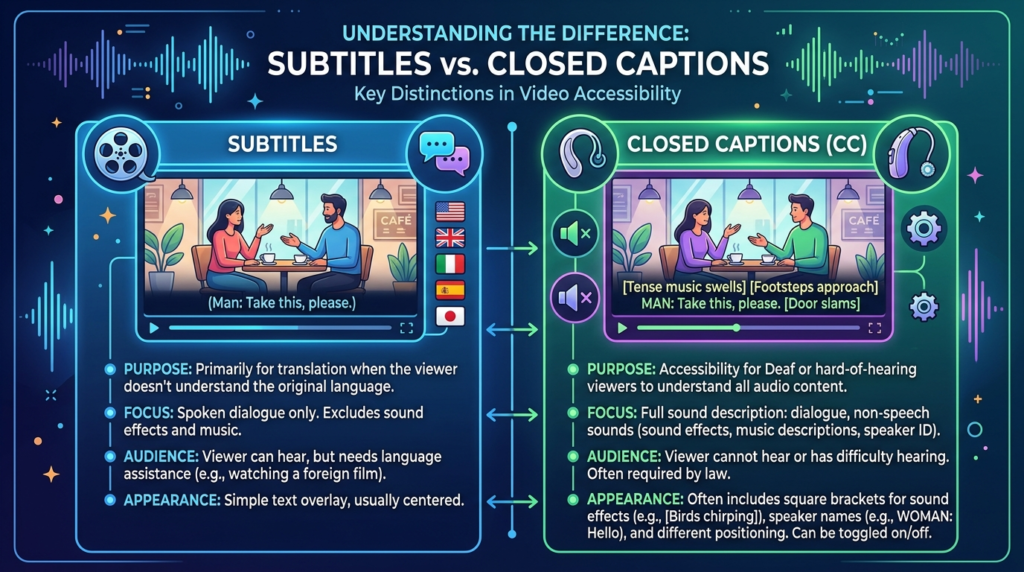
Subtitles are text versions of the spoken part of a video — basically a transcription of dialogue displayed on screen.
✔️ Key Features of Subtitles
-
Represent spoken dialogue only
-
Are typically language translations
-
Don’t include sound cues (e.g., [door slams])
-
Help people who don’t understand the language
-
Can be burned‑in (open) or user‑selectable (closed)
📌 Subtitles are extremely common in international film distribution — for example, watching a Korean drama with English subtitles.
📣 What Are Closed Captions?
Closed captions (CC) go beyond dialogue — they provide everything that is heard in the audio track:
✔️ Closed Caption Elements
-
Spoken dialogue
-
Speaker changes / identification
-
Sound effects (e.g., [laughs], [thunder rumbles])
-
Music cues ([soft piano music])
-
Background sounds relevant to understanding
Closed captions can be turned on/off by the viewer (hence “closed”), unlike open captions that are always visible.
🎯 Subtitles vs Closed Captions: Quick Comparison
| Feature / Use | Subtitles | Closed Captions |
| Dialogue text | ✔️ | ✔️ |
| Sound effects | ❌ | ✔️ |
| Music cues | ❌ | ✔️ |
| Speaker IDs | ❌ | ✔️ |
| Accessibility for Deaf/Hard of Hearing | ❌ (by default) | ✔️ |
| Language translation focus | ✔️ | Sometimes |
| Turn on/off | Depends | ✔️ |
👉 In short: All closed captions are subtitles, but not all subtitles are closed captions.
🧩 Why the Distinction Matters (Accessibility + Inclusion)
Understanding this difference isn’t just technical — it’s about people:
❤️ Closed captions support viewers who are:
-
Deaf or hard of hearing
-
In noisy environments
-
Watching with the volume off
-
Processing language in different ways
🌍 Subtitles help:
-
Viewers across language barriers
-
International audiences
-
Language learners
From an ethical and legal perspective, platforms and creators that care about inclusion should prioritize closed captions.
🧑💻 Closed Captions: A Deep Accessibility Breakdown
Closed captions are not optional extras — they are accessibility tools grounded in standards like:
📌 Accessibility Standards
-
WCAG (Web Content Accessibility Guidelines)
-
ADA (Americans with Disabilities Act)
-
FCC regulations for broadcast
These guidelines require captions to convey speech and non‑speech information.
📚 Subtitle Types You Should Know
There are a few categories:
1. Translated Subtitles
For audiences who don’t speak the language of the content.
2. Same‑Language Subtitles
For hearing viewers who want clarity (e.g., fast dialogue, accents).
3. Open Subtitles
Burned into the video permanently — cannot be turned off.
4. Closed Subtitles
Selectable via settings — appear only when the viewer chooses.
🎥Closed Captions vs Open Captions
Sometimes people confuse closed captions with open captions, so here’s a quick breakdown:
-
Closed Captions: Optional, toggled on/off.
-
Open Captions: Always visible — burned into the video.
Some creators prefer open captions for social platforms where viewers watch without sound.
📱 Platform Breakdown: How They Handle Subtitles & Captions
Each platform has its own approach:
➤ YouTube
-
Auto‑generated CC
-
Manual edits for accuracy
-
Multiple language subtitle tracks
➤ Facebook & Instagram
-
Auto captions available
-
Some languages supported
-
Good for accessibility and engagement
➤ TikTok
-
Auto captions with manual edit option
-
Great for quick, accessible content
➤ Streaming Services (Netflix, Prime Video)
-
Professional subtitles and CC
-
Often multiple languages
Platforms emphasize captions because they boost watch time and user retention.
🧠 Linguistic vs Accessibility Intent
Here’s a simplified way to think about it:
Subtitles = language support
Closed Captions = accessibility support
Yes, subtitles can be used for accessibility — but only if they include sound cues and non‑speech information.
✔️ Benefits of Subtitles
Subtitles help you:
✨ Reach global audiences
✨ Improve comprehension in noisy environments
✨ Support language learners
✨ Enhance retention of content
Research shows that subtitles can boost engagement — people watch longer when they can read and hear content together.
✔️ Benefits of Closed Captions
Closed captions help you:
❤️ Support accessibility needs
🎧 Improve comprehension for all audiences
🔇 Support viewers watching with volume off
🎯 Comply with accessibility regulations
📈 Boost SEO and discoverability
Captions help search engines index your video’s text content.
⚠️ Common Misconceptions
Let’s clarify a few myths:
❌ “Subtitles and captions are the same”
Not true — subtitles focus on dialogue; captions include all audio information.
❌ “Auto‑generated captions are always accurate”
Auto tools are helpful — but often wrong with names, slang, accents.
❌ “Captions are only for deaf viewers”
Captions help everyone — especially in sound‑off environments.
🧩 Real‑World Use Cases
Here’s how each is typically used:
🎬 Subtitles
-
Foreign films
-
Language learning
-
International releases
♿ Closed Captions
-
Accessibility compliance
-
Educational videos
-
Broadcast TV
-
Corporate training
🛠 How to Create Subtitles & Closed Captions (Step‑by‑Step)
📌 Option 1: Manual Creation
-
Transcribe dialogue
-
Time‑stamp each segment
-
Add translations (if needed)
-
Include sound cues (for CC)
-
Export as SRT/WEBVTT
📌 Option 2: Auto Tools (fast but rough)
-
YouTube’s auto captions
-
AI transcription services
-
Manual correction required
📌 Option 3: Professional Services
-
Human‑edited captions
-
Best accuracy
-
Wider language support
🧰 File Formats You Should Know
| Format | Use Case |
| SRT | Common subtitle/caption file |
| VTT (WebVTT) | Web video captions |
| TTML | Broadcast captions |
| SBV | YouTube captions |
| DFXP | Streaming captions |
Your platform dictates which format works best.
🧠 Accessibility Best Practices
✔️ Include speaker labels
✔️ Add non‑speech audio cues
✔️ Keep caption length readable
✔️ Time captions correctly
✔️ Use readable font/color contrast
✔️ Test on multiple devices
Accessibility isn’t just good practice — it broadens your audience.
❤️ Engagement & Retention Boost with Captions
Studies show that videos with captions:
-
Increase watch time
-
Improve comprehension
-
Drive repeat views
-
Boost shares and saves
People often watch videos on mute — especially on mobile — making captions essential.
🎨 Styling Tips for Subtitles & Captions
Make sure they are:
✨ Easy to read
📏 Short (2 lines max)
🕒 In sync with audio
📍 Positioned wisely (not covering key visuals)
Stylish captions can also be branded (consistent color/font).
🚀 SEO Benefits You Might Be Missing
Search engines can’t “hear” audio — but they can read text.
By including accurate captions:
✔️ Search engines index your video content
✔️ You increase keyword relevance
✔️ You drive organic discovery
Closed captions = SEO boost.
❌ Major Mistakes to Avoid
🚫 Relying solely on auto‑generated captions
🚫 Ignoring sound effects/IDs for accessibility
🚫 Using long, unreadable lines
🚫 Not testing across devices
🚫 Forgetting translation quality control
Mistakes quickly reduce comprehension and engagement.
💬 Frequently Asked Questions (Optimized for Search)
1. Are subtitles the same as closed captions?
No — subtitles focus on spoken dialogue; closed captions include all audio information and are designed for accessibility.
2. Do captions improve SEO?
Yes — captions provide searchable text that search engines can index.
3. Are open captions the same as closed captions?
No — open captions are burned into the video; closed captions can be toggled on/off.
4. Can subtitles help deaf viewers?
They can partially help, but only closed captions fully support deaf/hard‑of‑hearing users with sound cues.
5. What format should I use for captions?
Common formats include SRT and WebVTT — based on platform requirements.
6. Do social platforms auto‑generate captions?
Yes — platforms like YouTube, TikTok, Instagram, and Facebook offer auto captions, but accuracy varies.
7. Are translated subtitles accessible?
They help language comprehension, but accessibility still requires non‑speech information.
8. How do captions affect engagement?
Videos with captions have higher watch time and viewer retention.
🏁 Conclusion: Why This Difference Really Matters
Understanding the difference between subtitles and closed captions is more than industry jargon — it’s about creating content that respects, includes, and truly communicates with your audience.
Subtitles broaden reach across languages.
Closed captions open the door to accessibility, comprehension, and inclusivity.
In a world where people watch videos everywhere — whether on silent commutes, in noisy cafés, or with hearing differences — captions and subtitles aren’t optional — they’re essential.
💡 If you want more views, deeper engagement, and a more inclusive audience — captions are not just nice to have… they’re a must.
A lifestyle blogger creating cute, trendy, and relatable captions for everyday posts.